Club Planner Club Planner Support

Release notes

Every new feature, improvement and fix in Club Planner.

No release notes yet.

20 July 2026
Web Platform New
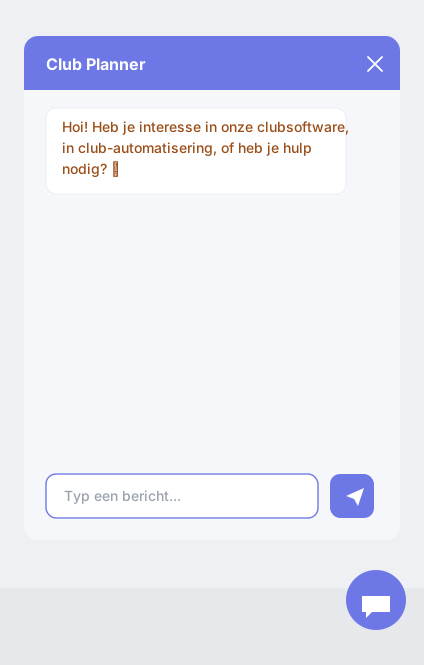
New: Club chatbot for your own website

You can now add a smart chatbot to your club’s website. It talks to visitors, answers their questions and turns them into leads — entirely in your club’s colours and style.

  • Answers questions about your club based on your website, social media and your own extra information.
  • Books appointments (a tour, a trial lesson …) straight into your leads calendar, taking your staff’s availability into account.
  • Can sign visitors up right away and give them a personal, automatically logged-in webshop link.
  • Shares your class schedule: which activities run, how many spots are still free and how to pay.
  • Works for a single club, or as one chatbot for all your locations (it asks the visitor which location applies).
  • Gives you an overview of how many chats and questions come in each day.

The AI is fully provided by Club Planner — there are no technical settings or API keys for you to manage. Installing it takes a single line of code on your website. Configure everything under Settings > Chatbot, where you can also try it out right away with the “Test chatbot” button.

16 July 2026
Mobile App New
Book multiple activities back-to-back

You can now book several activities back-to-back in a single booking (if your club has enabled this).

  • Select the activities in the order you want (1, 2, 3 ...).
  • You only see the times where the full sequence fits consecutively on the selected day.
  • The "Your sequence" bar shows per step what is already booked and what is still to choose.
Web Platform New
Multi-Activity: book multiple activities back-to-back

With the new calendar setting "Multi-Activity" your customers book several activities back-to-back in a single booking.

  • The customer first selects the activities in the order they want (1, 2, 3 ...).
  • The booking wizard and the reservation calendar then only show the times where the full sequence fits consecutively on the selected day.
  • The "Your sequence" bar shows per step what is already booked and what is still to choose.
  • In the slot wizard the sequence is booked as one consecutive time block, even across different rooms.

Enable it per calendar via Settings > Planner > Calendars > General tab.

15 July 2026
Web Platform New
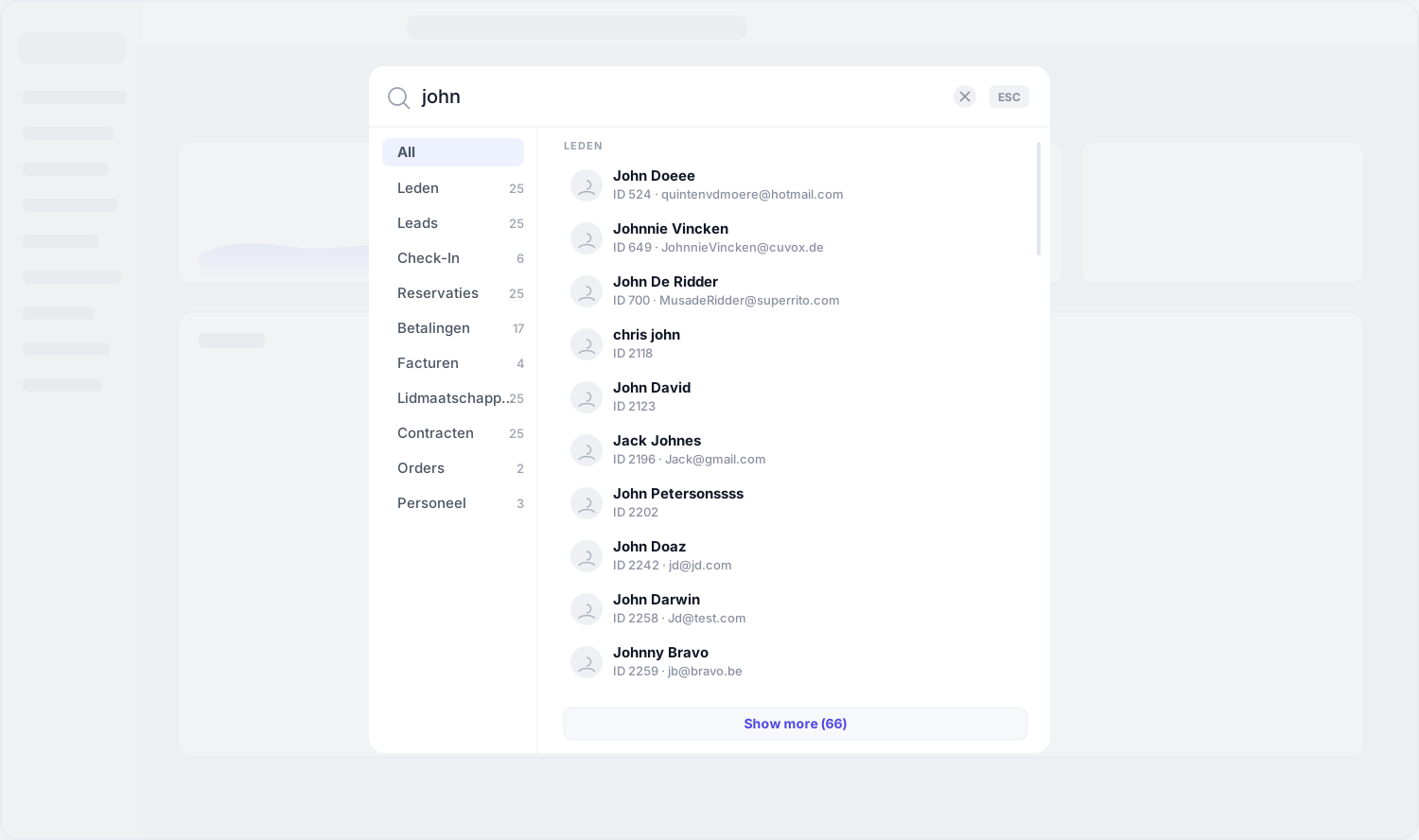
New: search everything with one shortcut (F4)

Find anything in Club Planner from a single search box. Press F4 (or click the search bar) to search across your whole club instantly.

  • Search members, leads, check-ins, reservations, classes, workouts, payments, invoices, memberships, contracts, orders, gift vouchers, bank batches and staff — all in one place.
  • Click a result to jump straight to it.
  • Quick actions: add a member, book a reservation, add a lead or sell a membership.
  • You only see what your access rights allow.
10 July 2026
Mobile App New 7.10
New update for the mobile app

The mobile app has been updated with the following new features:

  • Booking Wizard and Slot Wizard in Reservations: book classes and time slots quickly and easily, step by step, with the new wizards.
  • Deep linking: a link to the app now automatically opens the correct club.
  • Improved QR scanner: the member check-in scanner has a clearer, refreshed interface.
  • Check-in points: members can now check in at the check-in points in the club.
9 July 2026
Web Platform New
Price categories for online bookings

Activities can now have multiple rates, for example standard, child or senior. Members pick their rate and the number of people per rate while booking online.

  • Rates with a price per person are shown in the booking wizard and at checkout
  • Combine several rates in one booking; the payment overview shows a separate line per rate
  • The chosen rate also appears in the confirmation e-mail, the calendar invite, the reservation certificate and under My reservations
  • Rates are managed per activity in the web platform or the Club Planner desktop app
8 July 2026
Web Platform New
Promo codes: limit the total number of uses

You can now set a maximum number of times a promo code can be used in total, for example for the first 50 registrations.

  • New "Max. number" field in the promo code settings. This field and "Single use" are mutually exclusive: you use one or the other.
  • Once the maximum is reached, the code is automatically refused for online registrations and in the webshop, with a clear message.
  • Leave the field empty and the code remains unlimited, as before.
7 July 2026
Web Platform New
New Google integration: track sales and sign in with Google

There is now a dedicated Google item under Settings > Integrations. It brings everything Google-related together in one place:

  • Enter your Google Tag ID to connect your web platform to Google Analytics / Tag Manager.
  • Choose per sales flow (bookings, webshop, gift vouchers, reservations, club balance, subscriptions, invoices and table bookings) whether completed online purchases are sent to Google.
  • Set up Sign in with Google so your members can log in with their Google account.

This gives you accurate insight into your online revenue and conversions, fully under your own control.

2 July 2026
Desktop App New
Show multiple calendars together in the planner

You can now show other calendars inside a planner or sales calendar, so you see several calendars in a single overview without switching.

  • Choose which calendars to mirror in the calendar settings.
  • Mirrored appointments appear as a read-only overlay next to your own.
27 June 2026
Desktop App New
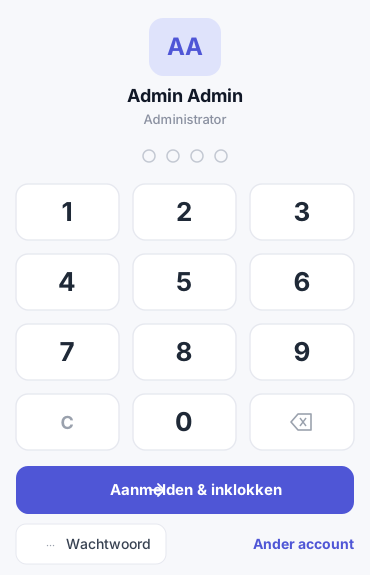
PIN code login for bar apps

Staff can now sign in to the bar apps with a short 4-digit PIN code, in addition to the regular password.

  • Set the code per employee in the Employees screen.
  • In the new bar app, use the PIN keypad; in the existing bar apps, simply type the code in the password field.
  • The code is stored encrypted.
26 June 2026
Web Platform New
Contracts now visible in the member profile

You no longer have to look elsewhere to see what a member is committed to. In the member profile, under Memberships, you will now find a Contract overview listing every contract linked to the member's memberships.

For each line you can see at a glance:

  • Linked membership and status (Active / Inactive)
  • Contract number and start and end date
  • Progress: percentage elapsed and days remaining
  • Contract total and a shortcut to the document

The start and end dates come straight from the linked contract — so always the real term.

Desktop App New
Moving a lead's appointment? Now you choose whether an email is sent

When you move a lead's appointment in the leads planner, the lead used to sometimes receive an email automatically. Now you decide.

  • You are only asked when an email would actually be sent to the lead.
  • Send the email – the email is sent right away.
  • Edit first – open the email, adjust it and send it yourself.
  • Don't send – move the appointment without an email.

The appointment in the lead's calendar is moved along with it – no more duplicate appointment.

Desktop App New
New 'Lead' activity type for standalone activities in the sales calendar

You can now set an activity to the Lead type. This is a simplified type for standalone activities: the maximum is fixed at 1 attendee and all other settings (prices, VAT, age, access ...) are switched off.

In the sales calendar your lead activities show up as buttons at the top of the appointment screen. Pick one and the description, duration and end time are filled in automatically, while the staff list is narrowed down to the linked employees. You select one activity at a time, or none.

24 June 2026
Web Platform New
Sign in with Google

Your staff can now sign in with their Google account, in addition to the existing Microsoft sign-in.

This option is not enabled by default: it needs to be configured first. Contact us to activate Google sign-in for your club.

12 June 2026
Desktop App Improved
Pop-up notifications for leads and reservations

Actions in Sales and on the calendar now show a short pop-up at the bottom right with the result — no window to dismiss:

  • When moving a lead or appointment.
  • When adding a member to an activity.
  • When recording a payment on a reservation, you immediately see the amount, the member and the payment method used.
  • An info mark for a regular message, a red error symbol when something fails.
Desktop App Improved
Cleaner leads dashboard

The leads dashboard in Sales got a calm visual refresh:

  • Neutral, uniform avatars instead of random colours — more focus on the names.
  • Date pills next to every lead so the due date is visible at a glance.
  • A single central loading indicator on the refresh button instead of one per column.
  • Modern search bar at the top.
  • Clicking a lead opens a detail dialog with arrows to navigate through every lead in the column.
  • Leads that ultimately sign up are highlighted in green in the 'Finished' column.
Web Platform New
New: notify staff members upon reservation and cancellation

For each activity you can now decide when the linked staff member is notified. The previous mail setting has been extended to a dropdown with four options.

  • Choose per activity: send nothing, notify upon a new reservation, upon a cancellation, or both.
  • In addition to the e-mail, the staff member now also receives an app notification.
  • You can find this setting in the new 'Notification' section of the activity settings.
Web Platform New
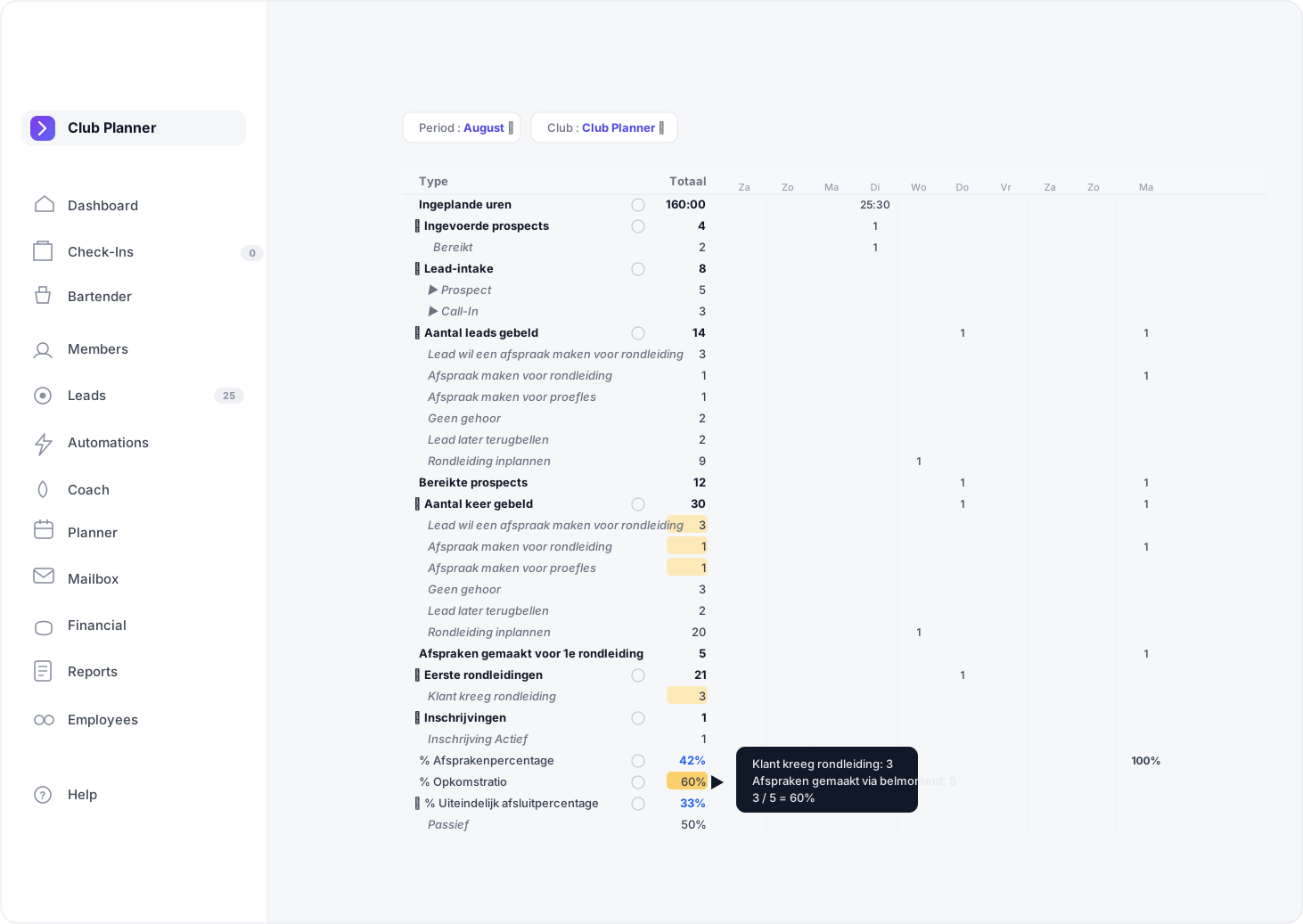
New: Sales Timeline report for leads

The new Timeline report under Leads gives a day, week or month overview of your full sales funnel: from reached prospects and first tours through to sign-ups and a computed success ratio. Filters for club, salesperson and period (date, month, rolling N weeks/months) live in a side panel.

  • Click any cell to see the underlying leads or linked members in a popup, including estimated revenue on the Linked Members tab.
  • Hover a %-cell to see how the ratio is built up; the source cells light up in the same column.
  • One-click expand/collapse for all sub-rows, plus PDF and Excel export.
  • The 'Today' column shares the planner's highlight color so it's easy to spot.

The numbers and the PDF output are identical to the desktop app — both now run on the same shared engine.

Web Platform New
USB scanners for cards and QR codes at reception

Connect USB barcode and QR scanners directly to the Club Planner web platform. Pair each scanner from Settings → Hardware → Scanners in Chrome or Edge and choose what should happen on every scan.

  • Four modes per scanner: Open member profile, Silent check-in, Check-in with popup and Ask on scan
  • Rich bottom-right popup showing photo, name and subscription status after a check-in
  • Up to three recent check-ins stay visible during busy reception periods
  • Check-ins list refreshes automatically without flicker
  • Scan an unknown card and immediately link it to a member or employee right from the profile screen
  • No external application required — works in Chrome and Edge on desktop
Web Platform New
TableBooker: customers order from their table

With the renewed TableBooker, customers order directly from their table or honesty bar using a QR code, in the same style as the webshop.

  • Customers pick articles with options and variants, pay online right away or put the order on the table tab (order now, pay later).
  • Members can sign in and pay their order partially or fully with their club balance.
  • Without a QR code, customers first choose the menu and the table; if there is only 1 choice, that step is skipped automatically.
  • The bar receives every order instantly on the bartender screen.
  • You can find the link under Settings > Links.
Web Platform New
New support portal with knowledge base and ticket desk

Our new support portal is live: a searchable knowledge base in four languages, support tickets with real-time updates and this release notes page.

10 June 2026
API New
Partner API: new integration layer for external systems

The new Partner API lets external partners (booking systems, payment providers, AI assistants, …) work with your club data securely and under your control.

  • Per-club key management: create and revoke API keys in Settings → Platform → Partner API.
  • Granular access: per key, choose per namespace (Members, Planner, Financial, Check-in, …) whether the partner can read only, read and write, or nothing.
  • Rate limit: 25 calls per 5 minutes by default to prevent abuse.
  • Logging: optional full call history per key for audit and debugging.
  • Documentation: live OpenAPI documentation at /api/partner/docs, ready to share with your partners.
  • AI integration: official MCP server for Claude Desktop, Cursor and Zed — partners can query data through natural language out of the box.