
This article explains where to find a member's retention status, what each status means and how the retention score is calculated. It lets you see at a glance which members need attention, and why.
What is the retention status?
The retention status shows how active and engaged a member is. Club Planner looks at the member's behaviour: check-ins, reservations, payments, the membership and app usage. Based on that, every active member gets a retention score from 0 to 100. The higher the score, the higher the risk that the member will leave.
The status helps you act in time: a message, a phone call or an invitation to a class, before the member decides to stop.
Where do you find the retention status?
On the member record. Go to Members, open the member and look under the name. The status is shown as a coloured label, for example "Medium risk 46". The number is the retention score.
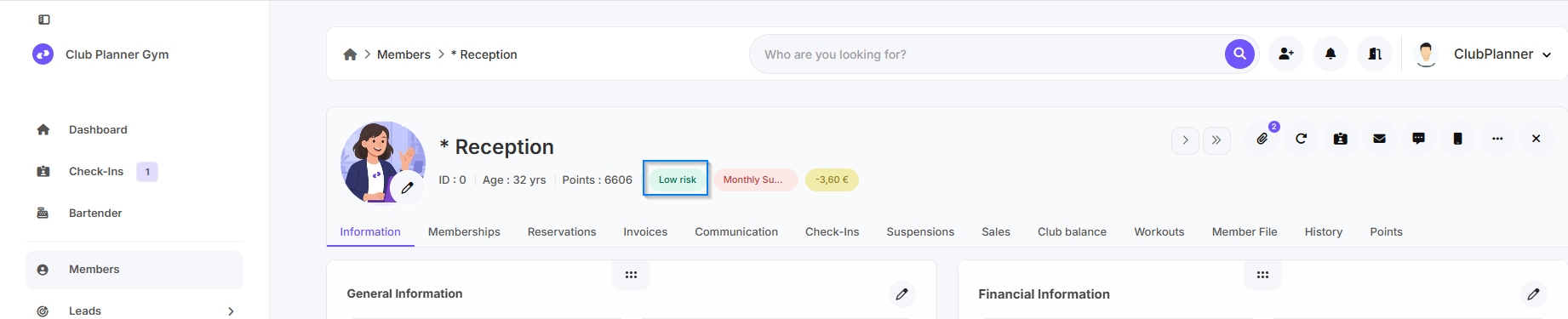
Click the label to see how the score is built: which signals count, how many points each signal adds and how the score evolved over the last 90 days. Every line is clickable and takes you to the underlying data, for example the member's check-ins or invoices.
In the member list. Filter on retention status or on top reason, and switch on the columns Score and Top reason via the gear icon.
On the dashboard. Under Dashboard > Members Retention you find the card "Retention risk" with the number of members at risk, the weekly distribution, the main reasons and the list of members who need attention. Click a number or a reason to open the matching members in the member list.
Overview of the statuses
| Status | Meaning |
|---|---|
| Inactive | The member has no valid membership. |
| Frozen | The membership is temporarily suspended. No score is calculated during the freeze. |
| Visitor | No active membership, but a check-in or reservation in the past or next 14 days. |
| Low risk | Score 0 to 34. The member is active as usual. |
| Medium risk | Score 35 to 59. One or more signals point to lower engagement. An automatic nudge (message, invitation) is usually enough. |
| High risk | Score 60 to 100. Several signals together, or one strong signal such as a failed payment. Personal contact is recommended. |
| Sleeping | No check-in and no attended or upcoming reservation in the past 90 days. This status always applies, whatever the score. |
The limits 35 and 60 are the defaults. You can change them under Settings > Members > Retention.
How is the score calculated?
The score is recalculated every night. After a failed payment, a sale, a cancellation or a freeze it is recalculated immediately. Club Planner always compares the member with their own habits, not with other members: someone who always comes twice a week is judged differently from someone who comes every day.
Signals that raise the score:
- Days since the last visit: the longer ago, the more points.
- Fewer visits than usual: the visits of the last 4 weeks compared with the member's own average over the 12 weeks before. A quiet period for the whole club (summer, for example) is not held against the member.
- Onboarding: for new members (first 90 days) we check whether they build a habit quickly, for example at least 4 visits in the first month.
- Payments: a failed direct debit or an open invoice older than 7 days.
- Reservations: no longer booking, frequent no-shows or frequent cancellations.
- Contract ending: a fixed-term contract that ends within 45 days without a renewal.
- Freeze or cheaper membership in the last 90 days.
- Regular coach left: the trainer the member followed most classes with is no longer in the calendar.
- Engagement: no more app logins, or negative feedback in a form.
Signals that lower the score:
- A visit in the last 7 days.
- More than 12 months of membership (and even more after 24 months).
- A group class or personal training session in the last 30 days.
Signals your club cannot measure (for example because you do not use access control) are left out. The score always stays on a scale from 0 to 100.
A member who has given notice gets score 100 with the reason "Cancellation notice received", so you can still get in touch during the notice period.
What can you do with it?
- Automations: under Automations you find ready-made journeys such as "We miss you", "First 90 days", "Win-back call", "Payment rescue" and "Wake up". They start automatically when a member reaches a given status and stop by themselves once the member is back at Low risk.
- From the member record: click the label and choose "Start win-back", "Add task" or "Add note".
- From the member list: filter on status or top reason and send the selection an e-mail, add them to an automation or give them a tag.
Settings
Under Settings > Members > Retention you can:
- switch the score-based retention status on or off (switched off, the status follows the days since the last visit: 14, 21 and 90 days);
- change the limits for Medium and High risk. You immediately see how many members end up in each status;
- choose whether new members get a score during their first 90 days.
Frequently asked questions
A member's score does not seem right. Where do I look?
Click the label on the member record. Every line shows what was measured and how many points it adds. "Recalculate now" refreshes the score immediately.
Why is a member Sleeping although they had a reservation?
Only attended or upcoming reservations count as activity. A cancelled reservation, or one the member did not show up for, does not count.
Do frozen members count?
No. No score is calculated during a freeze. After the freeze the calculation starts again.
Can I see the status through the API or an AI assistant?
Yes. The retention status, the score and the reasons are available through the Partner API and through the Club Planner connector for AI assistants.