
Dieser Artikel erklärt Schritt für Schritt, wie Sie die Meldung „Sie sind bereits auf einem anderen Gerät angemeldet“ bei einem Mitglied (einmalig) ausschalten.
Warum erhält das Mitglied diese Meldung?
Die MyClubPlanner-App wird in sehr vielen Clubs als Zugangsticket (QR-Code) genutzt, um Zutritt zum Club zu erhalten. Damit Mitglieder ihr Konto nicht mit anderen Personen teilen, ist in Club Planner eine Sicherung eingebaut, die prüft, auf welchen Geräten ein Mitglied angemeldet ist.
Es ist nicht möglich, auf zwei Geräten gleichzeitig angemeldet zu sein. Als zusätzliche Sicherheitsebene liegen außerdem mindestens 24 Stunden zwischen zwei verschiedenen Geräten. Das Mitglied kann sich also auf Gerät A abmelden und muss anschließend 24 Stunden warten, um sich auf Gerät B anzumelden.
In manchen Fällen — etwa bei Verlust des Smartphones oder beim Kauf eines neuen Smartphones — ist es sinnvoll, diese Meldung für das betreffende Mitglied auszuschalten:
Wie schalte ich diese Meldung für ein bestimmtes Mitglied aus?
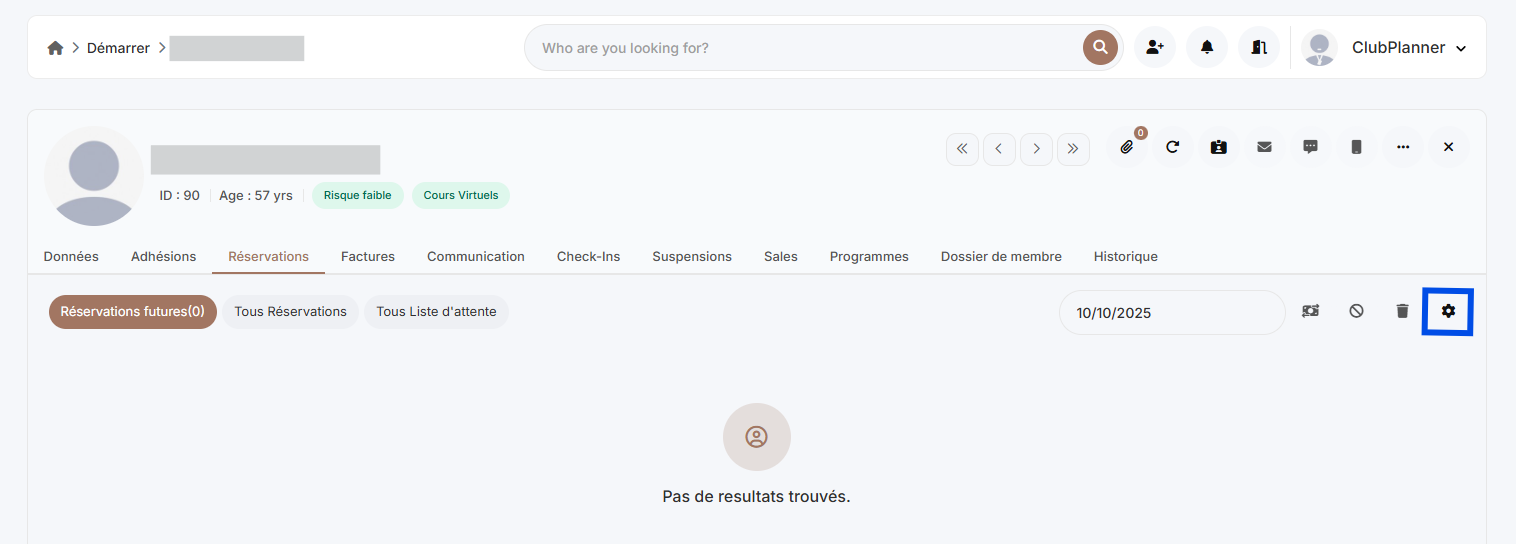
- Öffnen Sie die Mitgliederakte des Mitglieds
- Gehen Sie zu „Reservierungen“
- Klicken Sie auf „Einstellungen“
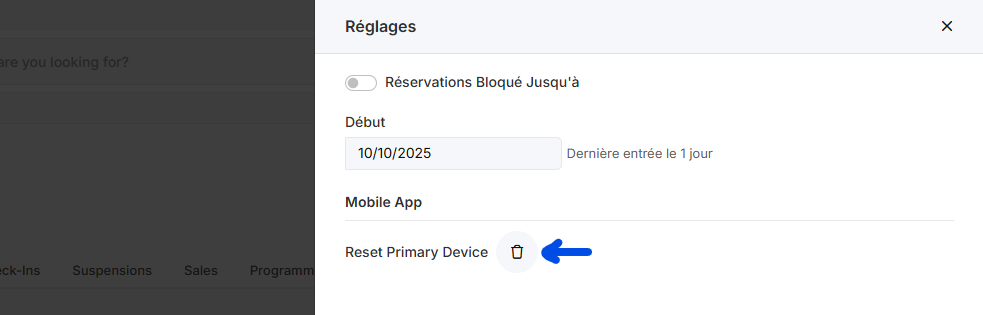
- Klicken Sie auf die Schaltfläche „Reset primary device“
- Die Gerätekontrolle ist nun zurückgesetzt — das Mitglied kann sich jetzt auf einem neuen Gerät anmelden
Kann diese Sicherung generell ausgeschaltet werden?
Ja, nehmen Sie dazu Kontakt mit dem Support-Center auf über support@clubplanner.be.