
This article explains how to refund a reservation that was paid directly (via Mollie) from within Club Planner.
Refund a reservation
Open the member’s profile.
Go to the reservations tab.
If you don’t immediately see the reservation, select the 'past reservations' period.
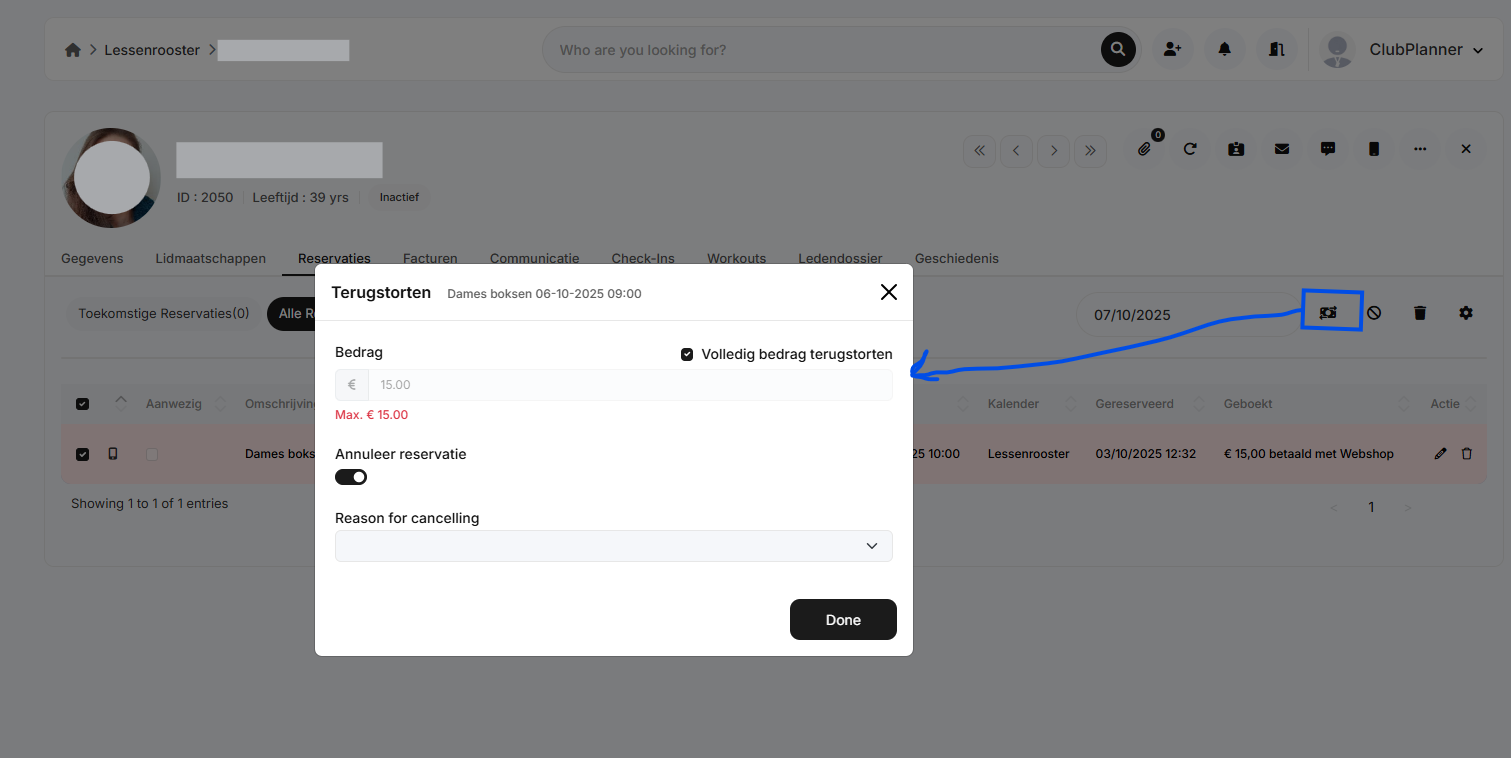
Click 'Refund'.
A pop-up window will appear. In this pop-up, you can:
Refund the full amount or a partial amount
Choose whether or not to cancel the reservation
Provide a reason for the cancellation
Click Done.
If you processed a full or partial refund, this has now been sent to Mollie. Mollie will refund the amount to the same account the customer originally used for payment.
The refund will be processed on the next business day. In most cases, the customer will receive the refunded amount in their bank account within 2 business days. If the customer paid by credit or debit card, the refund will appear on their account statement within 14 days after the refund has been processed.
If you wish to cancel the refund, this can be done within 2 hours after submitting the refund request. To do this, log in to your Mollie dashboard. More information