
In addition to direct debit, you can also automatically collect membership fees from your members' credit cards. The member registers their card once, Mollie stores it, and from then on the amount is automatically deducted each period. In this article you can read what it does, what you can expect from it, and how to set it up.
How it works
The member chooses a card instead of direct debit during sign-up in the web shop, or you convert an existing member from their member profile. In either case, the member enters their card details themselves on a secure Mollie page. You and Club Planner never see or store that information.
After that, everything runs automatically:
- The member receives a notification a few days before each deduction.
- On the due date, the amount is taken from the card.
- If a deduction fails, an automatic retry follows.
- If the card is about to expire, the member is asked in time to register a new card.
Why you would use this
- Fewer failed collections. A direct debit can be stopped or refused by a member at their own bank. A registered card does not depend on such a mandate.
- You see faster what goes wrong. A failed card payment arrives immediately via Mollie. With a direct debit, you only know that when the return file from the bank is read in, sometimes days later.
- The member stays in control. They receive a notification for each deduction, can replace their card themselves and can stop the mandate themselves.
- Handy for members without a local account number. Think of expats or cross-border workers, for whom a direct debit often runs into difficulties.
Direct debit continues to exist. You choose per membership what a new member receives, and existing members remain on direct debit as long as you do not convert them.
What you need beforehand
Your club pays via Mollie, and credit card is enabled on your Mollie account. If card is not yet enabled there, you request that first from Mollie. Club Planner checks this automatically when you enable card.
Step 1: enable card for your club
- Go to Settings.
- Click Payments and billing in the left column.
- Choose Direct debits and open the Card (recurring) tab.
- Turn on Offer card as payment method.
Below that are three settings. The default values work for most clubs:
- Advance notification — how many days in advance the member is notified of a deduction. This notification is mandatory for a recurring card payment.
- Retry after a failed deduction — after how many days the card is tried again.
- Warn before card expiry — how many days before the card expires the member is asked to register a new one.
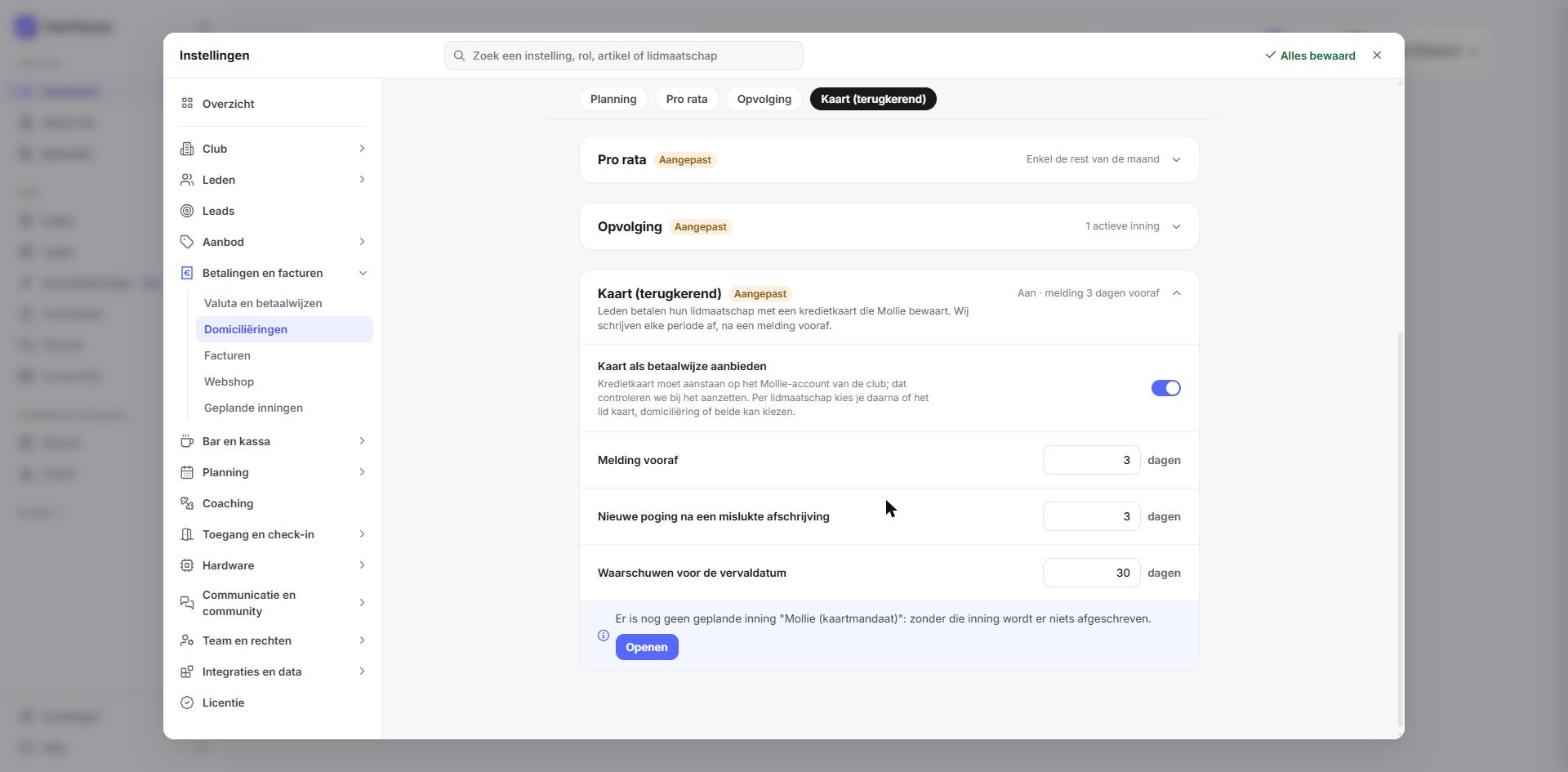
At the bottom, a message appears that there is no scheduled collection yet. You create that in the next step. Without that collection, nothing will be deducted.
Step 2: create the collection
- Go to Settings, Payments and billing, Scheduled collections.
- Click Add collection.
- Choose the template Mollie (card mandate).
- Check the name, club and time, and create the collection.
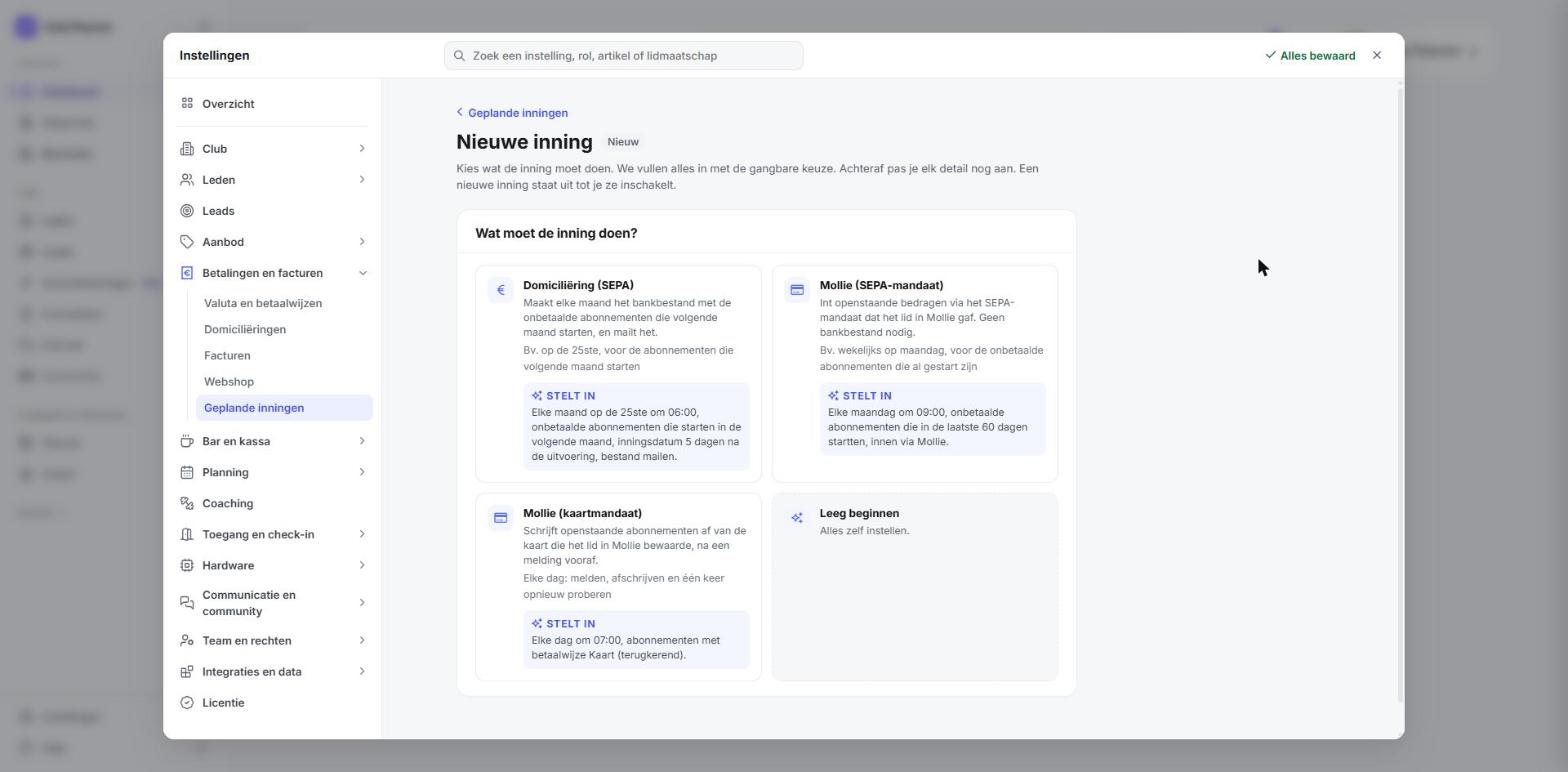
The collection runs every day and each time takes the outstanding amounts of subscriptions with card as payment method. Daily is correct: each membership has its own due date, and the collection picks up what is due that morning.
A new collection is deliberately off. Open the Test tab and start the test. You then immediately see which subscriptions and what amount the collection would take, without anything being sent or deducted. If that is correct, turn the collection on.
Step 3: choose per membership
- Go to Settings, Offer, Memberships.
- Open the membership and stay on the Basic tab.
- Find Payment method at sign-up and choose one of:
- Direct debit — nothing changes, the member signs a mandate as before.
- Card (recurring) — the member can only sign up with a card.
- Member chooses: card or direct debit — the member gets both options in the web shop.
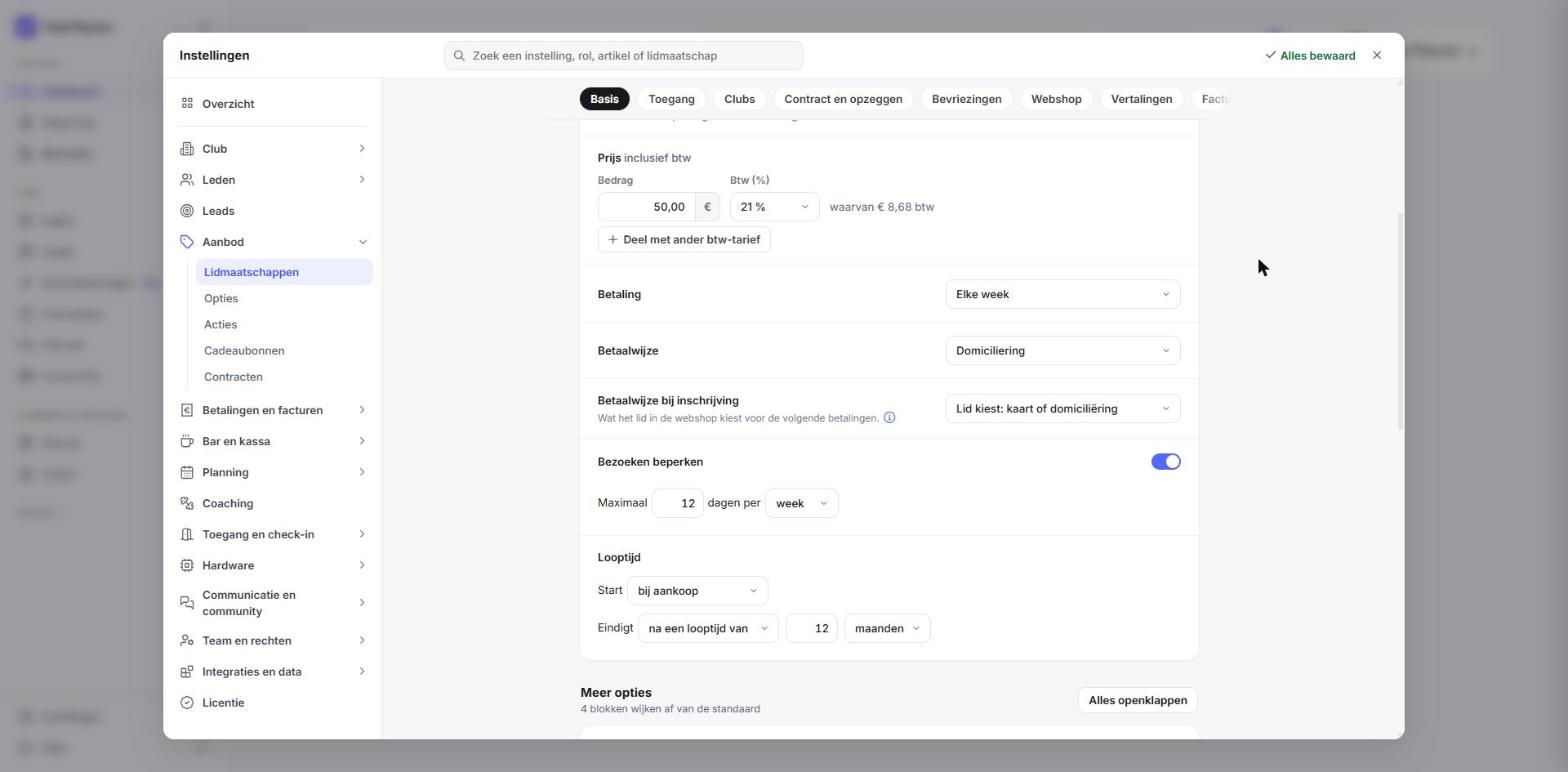
This setting only applies to new sign-ups via the web shop. You convert existing members as described below.
A new member signs up with a card
When checking out in the web shop, the member gets the block How do you want to pay? with a choice between card and direct debit. If the member chooses card, the card fields appear immediately on the same page.
At the bottom are the checkboxes the member must check, including the mandate in plain language: the amount, how often it is deducted, that the member can stop it themselves, and that they receive a reminder for each deduction. The button says what happens: pay and save the card. The first payment and the mandate thus take place in one action.
Convert an existing member to card
You do this from the member profile, for example while the member is at the desk.
- Open the member and go to Financial, Billing and mandate tab.
- On the right is the block Card (recurring). For a member paying by direct debit it says No card there.
- Click Send card link.
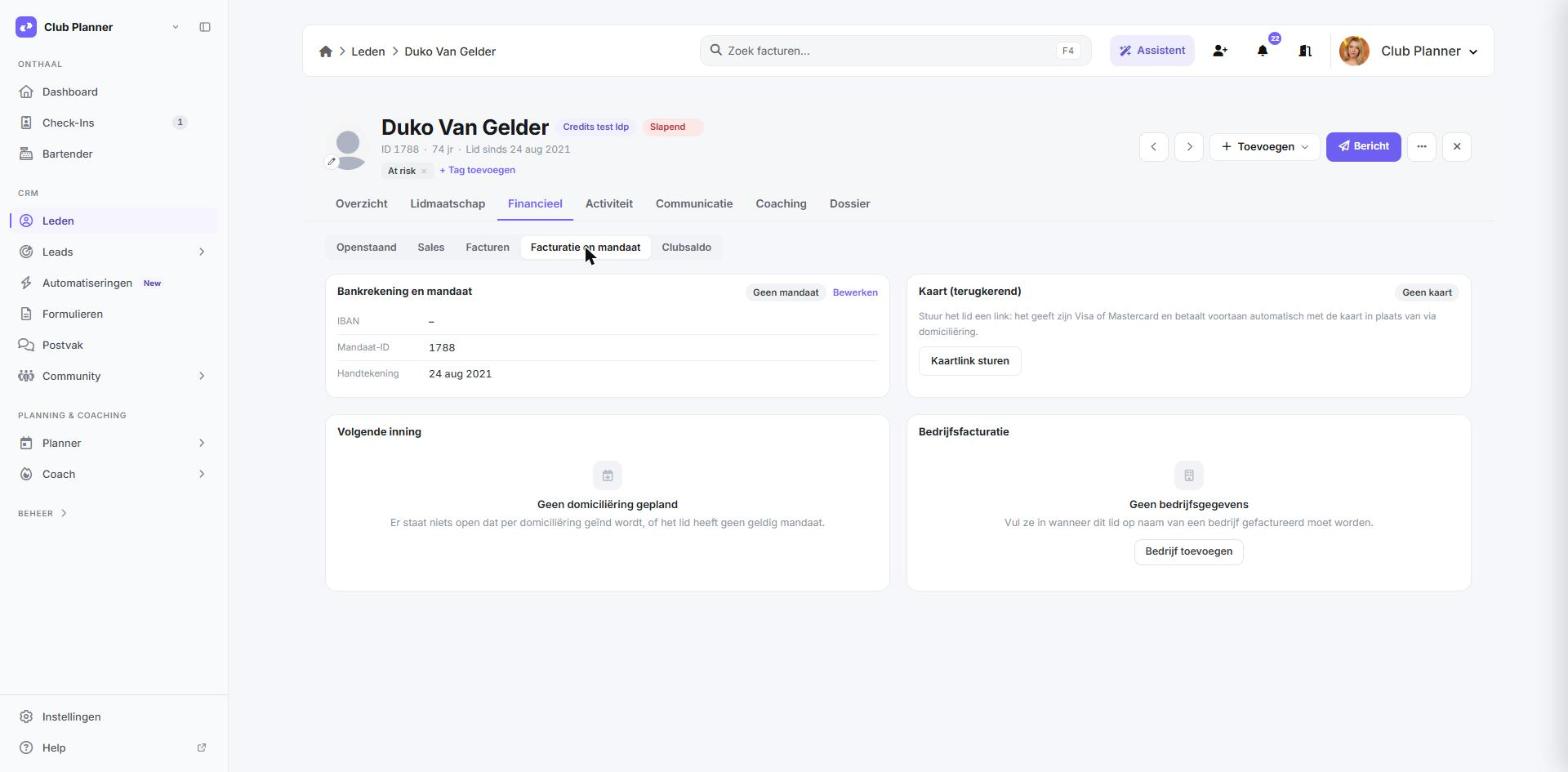
The member receives an email immediately in their own language with a link that is valid for seven days. They open that link on their own mobile, at the desk or later at home, enter their card and check the mandate checkbox.
As soon as the card is saved, the block on the member profile switches to Active, with the card brand, the last four digits and the expiry date. From the next period on, the membership fee will be taken from the card instead of being collected via direct debit. At that same place you can send the card link again or revoke a card.
Frequently asked questions
Can I enter the card details at the desk myself?
No, and that is deliberate. There is nowhere a field to enter a card number, not in the back office and not at the cash register. Once staff enters card numbers, your club falls under the security rules of the card industry. By having the member enter it themselves, the information only reaches Mollie.
Which cards can members use?
Visa and Mastercard.
What if a member's card expires?
The member receives a notification in time and can register a new card themselves. You can also send them a new card link from the member profile.
Can a member go back to direct debit?
Yes. Revoke the card on the member profile and register a direct debit mandate again.
What does a card payment cost?
For each card payment, Mollie charges a transaction fee, which is higher than for direct debit. The rates are in your Mollie agreement. You can pass on that cost via the transaction fee in your web shop settings.
Does direct debit continue to exist?
Yes. You choose per membership what you offer, and you can run both side by side.